> For the complete documentation index, see [llms.txt](https://samfisher91.gitbook.io/samfisher-blog/llms.txt). Markdown versions of documentation pages are available by appending `.md` to page URLs; this page is available as [Markdown](https://samfisher91.gitbook.io/samfisher-blog/skyfall-htb.md).

# Skyfall - HTB

<figure><img src="/files/MC5s3E0MqSm7237YRLhm" alt=""><figcaption></figcaption></figure>

<figure><img src="/files/eFL3vLDwMR7yFxabwvK2" alt=""><figcaption><p>proof of date/time of getting the foothold</p></figcaption></figure>

## Foothold

Open ports

<figure><img src="/files/scLi54u32YY3fzyk5lDs" alt=""><figcaption></figcaption></figure>

Fuzzing for vhosts

<figure><img src="/files/i5Ae45l4f8fcYoGw5paz" alt=""><figcaption></figcaption></figure>

![](file:///home/samfisher/.config/joplin-desktop/resources/65946bab68fb4729af31d2e5d592183a.png)

here shows its minio which is cloud object storage

<figure><img src="/files/dRGfzEHava3zHQgvx4t7" alt=""><figcaption></figcaption></figure>

<figure><img src="/files/Bv4k4kHmAcLZoW1mYhOR" alt=""><figcaption><p>shows s3 buckets in the error message</p></figcaption></figure>

if you try to visit the MinIO Metrics it will gives you 403 forbidden

<figure><img src="/files/OiTZGteOomcxH80tIMqu" alt=""><figcaption></figcaption></figure>

to bypass that ,we can intercept the request with burpsuite and use tab character "Double tab" after the directory path

<figure><img src="/files/EOVzf09375G25TEiroiQ" alt=""><figcaption></figcaption></figure>

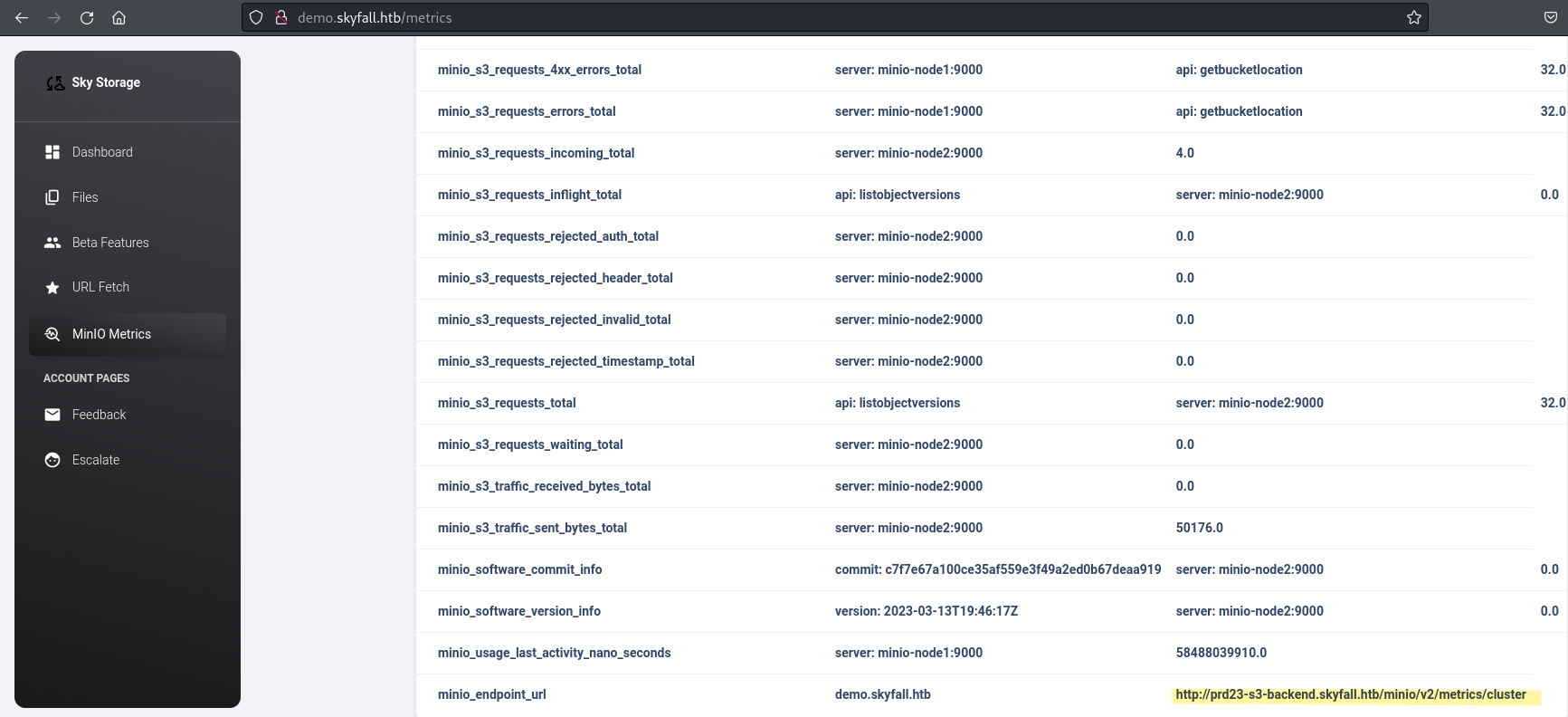
that's will show us a new domain we can use to communicate with MinIo objects

<figure><img src="/files/519YtnTdJPzoeQUT3st4" alt=""><figcaption></figcaption></figure>

minio is vulnerable to information disclosure below link for more reference

{% embed url="<https://www.pingsafe.com/blog/cve-2023-28432-minio-information-disclosure-vulnerability/>" %}

<figure><img src="/files/jnq4KgpfeW0Z8QumVd3H" alt=""><figcaption></figcaption></figure>

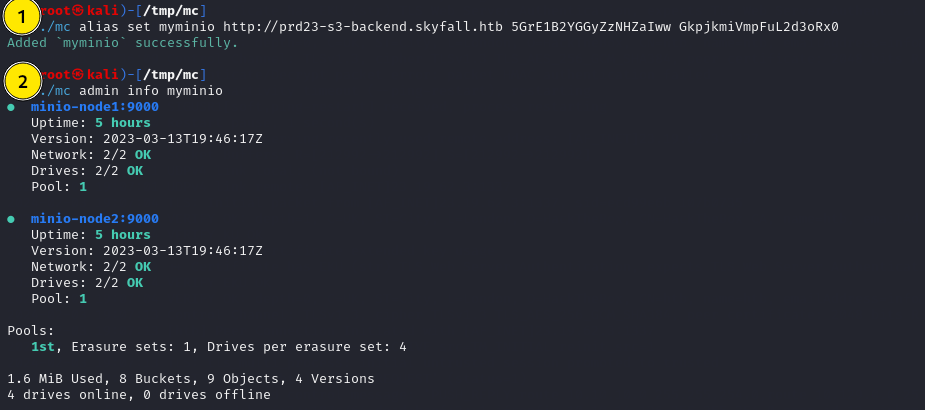
now we can download MinIo Client

<https://github.com/minio/mc>

first thing we need to do is to configure the server

<figure><img src="/files/uRdIFvUe6FaOAvpEjc9q" alt=""><figcaption></figcaption></figure>

<figure><img src="/files/q4o7dr2SMzHgbijbc3Lw" alt=""><figcaption></figcaption></figure>

found many different versions

<figure><img src="/files/YLLsmqSbRfzZG42Kihzy" alt=""><figcaption></figcaption></figure>

what i have done is undo twice and it will revert back twice then download the backup file

<figure><img src="/files/9FIr39GXOd3LpZHcarWU" alt=""><figcaption></figcaption></figure>

<figure><img src="/files/Q9N1ZwRH94sNiX7UN0dH" alt=""><figcaption></figcaption></figure>

downloading all versions and found hashicorp exports ,new domain + token that gonna help later with authentication

<figure><img src="/files/aHKqsJAHQT1tPScQbWVc" alt=""><figcaption></figcaption></figure>

now we can login using vault tool from hashicorp ,but as per documentation we need to export VAULT\_ADDR to the found domain ,then we login

<figure><img src="/files/LXJd1JzcgzhGNAUBhoWT" alt=""><figcaption></figcaption></figure>

now following this from hashicorp documentation

{% embed url="<https://developer.hashicorp.com/vault/docs/secrets/ssh/one-time-ssh-passwords>" %}

<figure><img src="/files/yqu2r57HSOhrpXi2qQWZ" alt=""><figcaption></figcaption></figure>

<figure><img src="/files/FjIMjNdVpsHO1fD5z1AX" alt=""><figcaption></figcaption></figure>

### Root

sudo -l

<figure><img src="/files/EVkuTJ8O15TLF6gMD8h7" alt=""><figcaption></figcaption></figure>

First create a new file "debug.log" for the flag "-d" to save the debug output to that file and extract the used master token

<figure><img src="/files/GYa70savn3RXxSLOdhfJ" alt=""><figcaption></figcaption></figure>

<figure><img src="/files/HKwFIKLU6AeyrN70WMy8" alt=""><figcaption></figcaption></figure>